使用SOLIDWORKS和Windows API运行力学约束命令
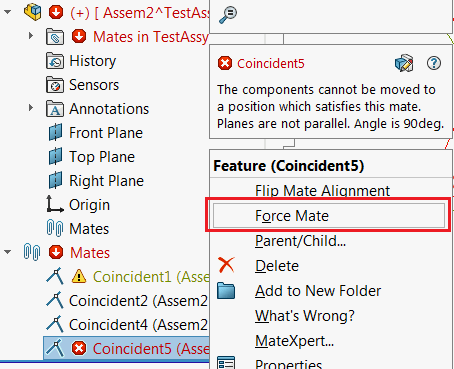 { width=350 }
该示例演示了如何运行“力学约束”命令,以解决具有重建错误的约束。该宏基于Windows和SOLIDWORKS API的组合。
#If VBA7 Then
     Private Declare PtrSafe Function SendMessage Lib "User32" Alias "SendMessageA" (ByVal hWnd As Long, ByVal wMsg As Long, ByVal wParam As Long, lParam As Any) As Long
#Else
     Private Declare Function SendMessage Lib "User32" Alias "SendMessageA" (ByVal hWnd As Long, ByVal wMsg As Long, ByVal wParam As Long, lParam As Any) As Long
#End If

Dim swApp As SldWorks.SldWorks

Sub main()

    On Error Resume Next

    Set swApp = Application.SldWorks

    Dim swAssy As SldWorks.AssemblyDoc

    Set swAssy = swApp.ActiveDoc

    If Not swAssy Is Nothing Then

        Dim swMateFeat As SldWorks.Feature
        Set swMateFeat = swAssy.SelectionManager.GetSelectedObject6(1, -1)

        Dim swMate As SldWorks.Mate2
        Set swMate = swMateFeat.GetSpecificFeature2

        If Not swMate Is Nothing Then

            Dim isWarn As Boolean
            If swMateFeat.GetErrorCode2(isWarn) = swFeatureError_e.swFeatureErrorNone Or True = isWarn Then
                MsgBox "The Force Mate command is only applicable to constraints with rebuild errors"
            Else
                ForceMate swMate
            End If

        Else
            MsgBox "Please select a constraint"
        End If
    Else
       MsgBox "Please open an assembly"
    End If

End Sub

Sub ForceMate(mate As SldWorks.Mate2)

    Dim swMateFeat As SldWorks.Feature
    Set swMateFeat = mate
    swMateFeat.Select2 False, -1

    Const WM_COMMAND As Long = &H111
    Const CMD_FORCE_MATE As Long = 13724

    Dim swFrame As SldWorks.Frame

    Set swFrame = swApp.Frame

    SendMessage swFrame.GetHWnd(), WM_COMMAND, CMD_FORCE_MATE, 0

End Sub